

Client-Server Communication
Exploring the applications of socket programming in C
To get more familiar with client-server communication I created a simple chat room that would allow users to connect and chat with their friends as long as they know the server IP address and listening port as well as the server passcode. I created this for both UDP and TCP communication, demoed below using WSL and tmux to show different consoles together. Here I just use the local machine IP as the server for simplicity.
What I Learned
This project opened my eyes to some common features of client-server communication. While I just use the sockets to transfer chat messages here, this communication could easily be adapted to suit an application protocol. The text sent over the sockets could represent commands in a REST API. For example, the server would parse client requests sent over the socket and then perform some functionality based on the request received. If the client sent "GET some_file.txt", the server could take that local file and send its content over to the client.
Taking it a step further
With this realization, I decided to turn my chat room into a simple GETFILE API that can request a file from the server and receive its content.
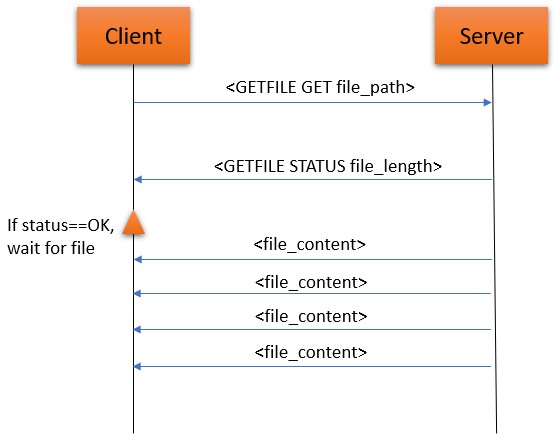
For a one client - one request scenario this was a simple adaption, re-using the request parser from the chat room and reacting with the response header and file contents. However, a true server needs to be able to handle multiple clients all sending requests at once. This was solved by having the server keep a queue of incoming requests and processing them one-by-one.
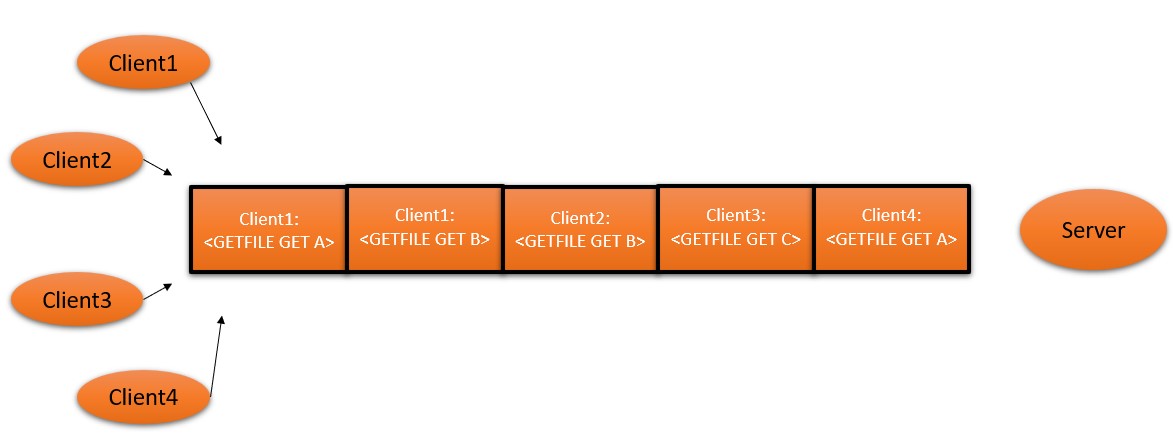
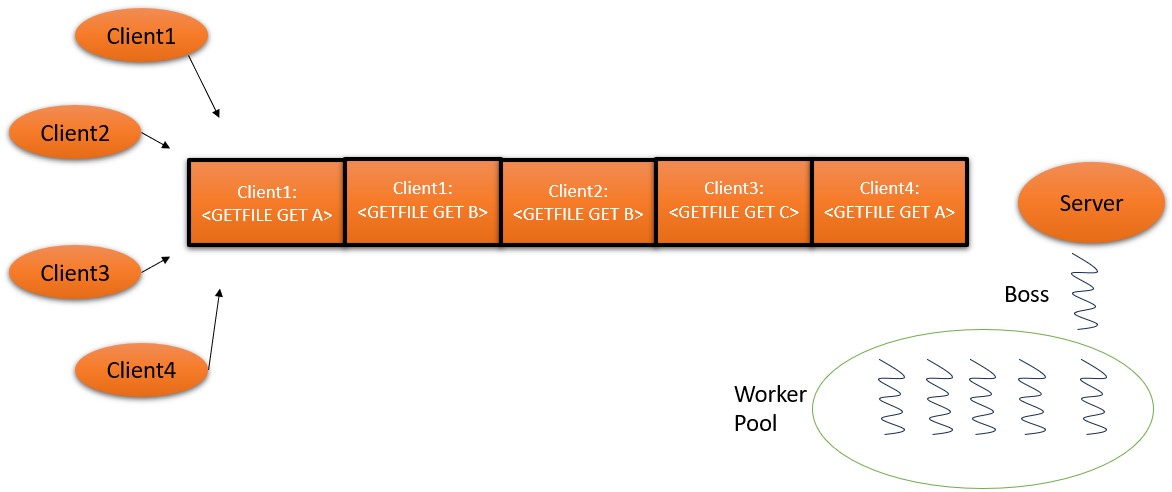
While this tackles the multi-client problem, this is inefficient and will cause response time delays. If client4 requests file A and that file is very large, the server will be stuck processing that request while the other clients await their response headers. To fix this, I added boss-worker multi-threading to the server. In this framework, there is one 'Boss' thread that manages incoming requests and delegates the response processing to other 'Worker' threads. This allows multiple requests to be processed concurrently! This brings in the need for mutex locking to protect shared data such as the task queue and concurrently accessed files.
Communication Setup Code
TCP Code
SERVER
					// Build a TCP socket
					socket_signal = socket(AF_INET , SOCK_STREAM , 0);
					if (socket_signal == -1) {
						printf("Could not create socket");
					}

					// Prepare the sockaddr_in structure
					server.sin_family = AF_INET;
					server.sin_addr.s_addr = inet_addr("127.0.0.1"); // (or INADDR_ANY)
					server.sin_port = htons( port );

					// Attempt bind
					if( bind(socket_signal,(struct sockaddr *)&server , sizeof(server)) < 0)
					{
						puts("bind failed");
						return 1;
					}

					printf("Server started on port %d. Accepting connections\n", port);

					// Listen, 10 max connections
					listen(socket_signal , 10);
					// Build a TCP socket
					socket_signal = socket(AF_INET , SOCK_STREAM , 0);
					if (socket_signal == -1)
					{
						printf("Could not create socket");
					}

					// Prepare the sockaddr_in structure
					server.sin_addr.s_addr = inet_addr(hostname);
					server.sin_family = AF_INET;
					server.sin_port = htons( port );

					// Connect to server
					if (connect(socket_signal , (struct sockaddr *)&server , sizeof(server)) < 0)
					{
						puts("connect error");
						return 1;
					}
UDP Code
SERVER
					//Build a UDP socket
					socket_signal = socket(AF_INET , SOCK_DGRAM , 0);
					if (socket_signal == -1) {
						printf("Could not create socket");
					}

					//Prepare the sockaddr_in structure
					memset(&server, 0, sizeof(server));
					server.sin_family = AF_INET;
					server.sin_addr.s_addr = inet_addr("127.0.0.1"); // (or INADDR_ANY)
					server.sin_port = htons( port );

					//Attempt to bind
					if( bind(socket_signal,(struct sockaddr *)&server , sizeof(server)) < 0)
					{
						puts("bind failed");
						return 1;
					}

					printf("Server started on port %d. Accepting connections\n", port);
					//Build a UDP socket
					socket_signal = socket(AF_INET , SOCK_DGRAM , 0);
					if (socket_signal == -1)
					{
						printf("Could not create socket");
					}

					//Prepare the sockaddr_in structure
					memset(&server, 0, sizeof(server));
					server.sin_addr.s_addr = inet_addr(hostname);
					server.sin_family = AF_INET;
					server.sin_port = htons( port );

					// Attempt to connect to server
					if(connect(socket_signal, (struct sockaddr *)&server, sizeof(server)) < 0)
					{
							printf("\n Error : Connect Failed \n");
							exit(1);
					}